
CopyOnWriteArrayList in Java
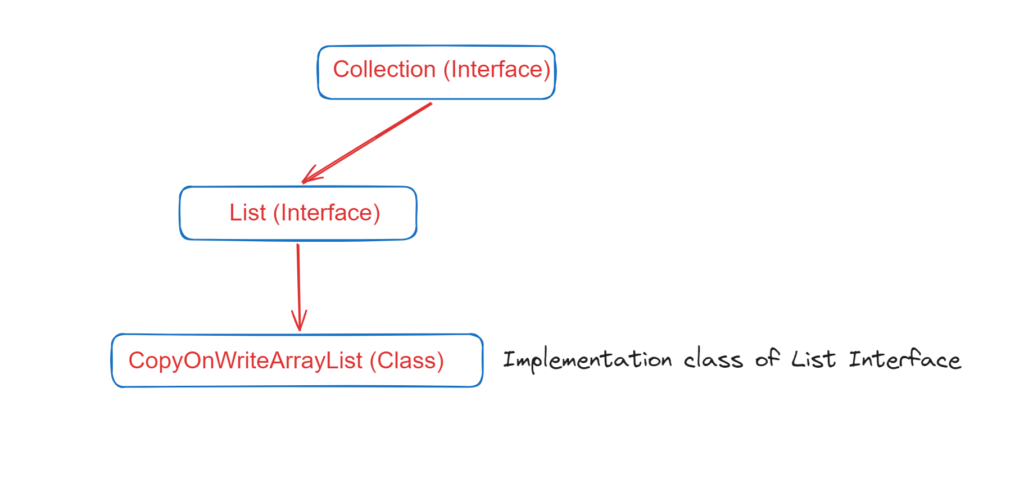
- CopyOnWiteArrayList is implementation class of List Interface which is a thread safe version of ArrayList. Hence more than one thread can happily operate on this.
- While Iterating the List we can do the modification at the same time and we will not get any exception.
- It implements Serializable, Clonable & RandomAccess Interface.
- In this insertion order is preserved.
- Duplicate object are also allowed.
- Heterogeneous object are also allowed.
- Null insertion is also possible.
- If update operation is performing on CopyOnWriteArrayList then it create copy of that and on that copy update operation are performed and after updation/modification JVM merge the copy with the main copy.
- Because of update operation is performed on cloned copy of CopyOnWriteArrayList then there is no effect for the threads which are performing read operation.
- Its Iterator is fail-safe. It means while one thread is iterating its object, another thread can happily perform the update operation and we will not get any Exception.
- It is costly to use, because for every update operation a cloned copy will be created. Hence CopyOnWriteArrayList is the best choice if several read operations but less number of write operations are required to perform.
- We can not perform remove operation on CopyOnWriteArrayList. And we try to do so then we will get RuntimeException saying UnsupportedOperationException.
Difference between ArrayList and CopyOnWriteArrayList
Constructor of CopyOnWriteArrayList
- CopyOnWriteArrayList cowal = new CopyOnWriteArrayList();
- CopyOnWriteArrayList cowal = new CopyOnWriteArrayList(Collection c);
- CopyOnWriteArrayList cowal = new CopyOnWriteArrayList(Object[] obj);
Important Methods of CopyOnWriteArrayList
- Boolean addIfAbsent(Object obj);
- int addAllAbsent(Collection c);
1) Boolean addIfAbsent(Object obj);
With this method the element will be added if and only if CopyWriteArrayList does not contain the provided object.
					package copyOnWriteArrayList;
import java.util.concurrent.CopyOnWriteArrayList;
public class SeperateMethods {
    public static void main(String[] args) {
        CopyOnWriteArrayList<Integer> c = new CopyOnWriteArrayList<>();
        c.add(10);
        c.add(20);
        c.add(29);

        c.addIfAbsent(10);
        c.addIfAbsent(30);
        System.out.println("Ouput using addIfAbsent method : "+c);
    }
}
Output and Explanation:
Ouput using addIfAbsent method : [10, 20, 29, 30]
The element 10 that is at line 10 is not added into the list because it is already present. And element 30 is added because it is not present in the above list.
2) int addAllIfAbsent(Collection c);
The addAllIfAbsent method will add only those object of the collection which are not present in the CopyOnWriteArrayList. And if element is already present then that element will not be added. But if you are using addAll() method the all the elements will be added either they are present in the CopyOnWriteArrayList or not.
					package copyOnWriteArrayList;
import java.util.ArrayList;
import java.util.concurrent.CopyOnWriteArrayList;
public class SeperateMethods {
    public static void main(String[] args) {
        CopyOnWriteArrayList<Integer> c = new CopyOnWriteArrayList<>();
        c.add(10);
        c.add(20);
        c.add(29);

        ArrayList<Integer> l1 = new ArrayList<>();
        l1.add(20);
        l1.add(29);
        l1.add(34);

        c.addAll(l1); // adding ArrayList l1 using addAll method
        System.out.println("Result using addAll method : "+ c);

        ArrayList<Integer> l2 = new ArrayList<>();
        l2.add(20);
        l2.add(34);
        l2.add(50);
        l2.add(60);

        c.addAllAbsent(l2); // adding ArrayList l2 using addAllAbsent method
        System.out.println("Result using addAllAbsent method : "+c);
    }
}
Output and Explanation:
Result using addAll method : [10, 20, 29, 20, 29, 34]
Result using addAllAbsent method : [10, 20, 29, 20, 29, 34, 50, 60]
Read and Write Operation on CopyOnWriteArrayList simultaneously
					package copyOnWriteArrayList;
import java.util.Iterator;
import java.util.concurrent.CopyOnWriteArrayList;
public class COWAL1 extends Thread{
    static CopyOnWriteArrayList<String> l = new CopyOnWriteArrayList<>();
    @Override
    public void run() {
        try{
            Thread.sleep(2000);
        }catch(InterruptedException e){
            e.printStackTrace();
        }
        System.out.println("Child thread is adding new element to COWAL");
        l.add("C");
    }

    public static void main(String[] args) {
        l.add("A");
        l.add("B");
        COWAL1 c = new COWAL1();
        c.start();
        Iterator<String> itr = l.iterator();
        while (itr.hasNext()) {
            String s = (String)itr.next();
            System.out.println("Main thread iterator the COWAL and current object is : "+ s);
            try {
                Thread.sleep(2000);
            } catch (InterruptedException e) {
                e.printStackTrace();
            }
        }
        System.out.println(l);
    }


// We will not get any exception because CopyOnWriteArrayList is thread safe and comes under concurrent collection
Output:
Main thread iterator the COWAL and current object is : A
Child thread is adding new element to COWAL
Main thread iterator the COWAL and current object is : B
[A, B, C]
remove() method on CopyOnWriteArrayList
					// COWAL can not perform remove() opertion. And if we are trying to do so then we will get UnsupportedOperationException.
// But normal ArrayList can do perform remove() opeation.

package copyOnWriteArrayList;

import java.util.Iterator;
import java.util.concurrent.CopyOnWriteArrayList;

public class COWAL_UnsupportedOperationException {
    public static void main(String[] args) {
        CopyOnWriteArrayList<String> l = new CopyOnWriteArrayList<>();
        l.add("A");
        l.add("B");
        l.add("C");

        Iterator itr = l.iterator();
        while (itr.hasNext()) {
            String s = (String)itr.next();
            if(s.equals("C")){
                itr.remove(); // java.lang.UnsupportedOperationException
            }
        }
        System.out.println(l);
    }
}